

LosslessCut
The swiss army knife of lossless video/audio editing — trim, cut, merge and remux without re-encoding, with FFmpeg bundled
Note: Please open in the PC Client. Go to download >>>
Features
System Requirements
Minimum 8GB RAM. Low storage requirement (1GB reserved).
macOS 15+: Supports both Intel and M-series chips.
Windows 10/11 64-bit: No specific GPU requirements.
Screenshots
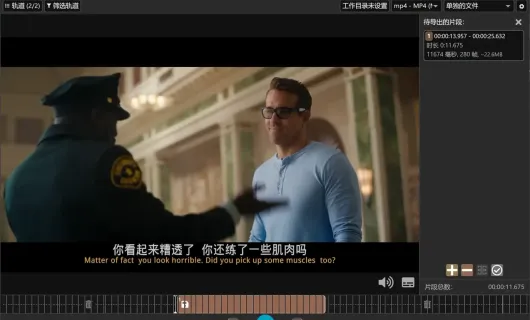
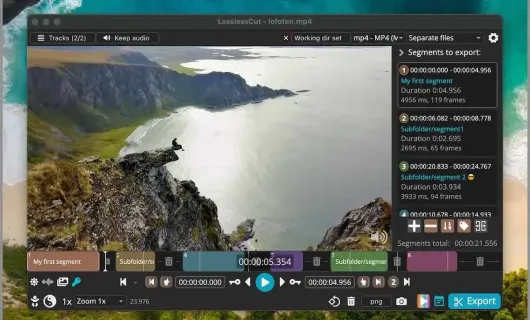
Introduction
LosslessCut is a free, open-source app for lossless (with an optional lossy fallback) cutting and joining of video and audio. Built on Electron + FFmpeg, its core idea is never re-encode when you don't have to — clips are trimmed and merged at original quality, usually in seconds even for multi-GB files.
What it lets you do:
- Cut losslessly: mark in/out points on a timeline and export without re-encoding; split at the playhead with a single key, keyboard-driven throughout.
- Trim and join: export many segments separately or concatenate them losslessly; files with matching codec parameters (e.g. from the same camera) merge directly.
- Automatic marking: built-in scene-change, black-frame and silence detection generate cut points for you — great for trimming long recordings, ads and dud takes.
- Tracks and subtitles: drop or keep specific audio tracks, extract audio, attach extra music or subtitle tracks.
- Picture adjustments: lossless rotation/flipping/mirroring and cropping of black bars (where the codec allows), plus simple filters, burn-in text watermarks and framerate/timestamp tweaks.
- Captures and frame exports: full-resolution snapshots, or batch image sequences at fixed intervals.
- Remux without transcoding: change the container (e.g. MKV → MP4) while leaving the picture and sound untouched.
- Frame-accurate fallback: re-encode (lossy) when you need exact cut points or unified parameters, with hardware-accelerated encoders available.
Product highlights:
- Batteries included: FFmpeg ships with the app — no setup, no command line.
- Saveable projects: the whole cut list is stored as a project you can reopen later.
- Plays well with others: export/import segment lists as CSV or EDL, or emit the equivalent FFmpeg command for scripts and other editors.
- Batch-friendly: load and export multiple files at once, plus a CLI for batch processing.
- Local and private: everything runs on your machine, nothing is uploaded.
Limitations: lossless cut points snap to the nearest keyframe, so in/out can be off by about a frame (switch to re-encoding for frame precision); it is a cutter, not a full editor — no effects, transitions or colour grading.
Platforms: Windows, macOS (separate Apple silicon and Intel builds), Linux (AppImage, tar.bz2, Snap).