Skip to content

BackApp Details
Shotcut
A cross-platform video editor offering broad format support, powerful filters, and easy timeline editing
Note: Please open in the PC Client. Go to download >>>
Features
System Requirements
Minimum 8GB RAM. Low storage requirement (1GB reserved).
Windows 10/11 64-bit: No specific GPU requirements.
macOS 11+: Supports both Intel and M-series chips.
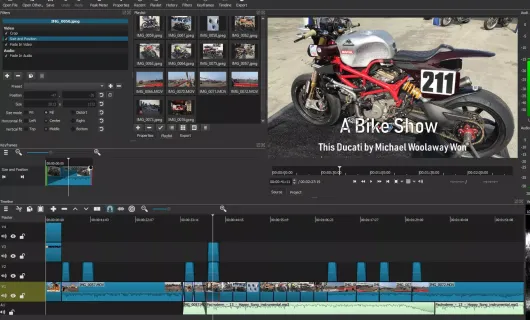
Screenshots
Introduction
1. Key Features & Highlights
Shotcut is a free, open-source, cross-platform non-linear video editor designed for beginners, hobbyists, and intermediate content creators.
- Wide Format Support: No import required—native editing means you can directly drag and drop video, audio, and image files without pre-transcoding, thanks to extensive format support.
- Intuitive Multi-Track Timeline: Features a flexible multi-track timeline supporting precise trimming, splicing, picture-in-picture, multi-channel audio mixing, text overlays, and seamless transitions.
- Rich Filters & Effects: Packed with advanced video and audio filters, including color grading, chroma key (green screen), noise reduction, EQ, and reverb, all controllable with keyframe animations.
- Lightweight & Hardware Accelerated: Highly customizable layout with GPU-accelerated processing and smooth interactive scrubbing for previewing.
2. Primary Use Cases
- Content Creation & Vlogging: Editing videos for platforms like YouTube, TikTok, and Bilibili, including tutorials and daily vlogs.
- Personal & Family Videos: Combining holiday clips, wedding videos, home movies, and personal memories.
- Educational & Training Videos: Trimming screen recordings, webcam captures, and adding voiceovers or annotations.
- Podcasting & Audio Editing: Multi-track audio trimming, mixing, and basic sound enhancement.
3. Developer & Team
- Development Team: Maintained by Meltytech, LLC, with Dan Dennedy as the primary creator and lead maintainer (who is also a co-founder of the underlying MLT framework).
- Open Source Model: Released under the GPLv3 license, driven by a vibrant global open-source contributor community.
4. Underlying Architecture & Tech Stack
- Multimedia Core (MLT Framework): Built upon the MLT (Media Lovin' Toolkit) engine, which manages video compositing, filter pipelines, and non-linear editing tasks.
- Codecs & I/O (FFmpeg): Powered by FFmpeg libraries under the hood, enabling broad support for hundreds of audio/video formats and codecs.
- GUI Framework (Qt Framework): Developed with Qt (Qt 6 / QML / C++), providing a native and consistent cross-platform user interface on Windows, macOS, and Linux.
- Graphics & Processing Engine: Utilizes OpenGL, Movit, and Frei0r plugins for GPU-accelerated video rendering and effect processing.
LicenseGPL-3.0 license